Session 9 – notes
Here are some notes for the Monday lecture in week 5. I spent most of the time going through the slides and implementing some triggers – you can see the slides here, and you can read more about triggers in SQLite here.
Using table constraints to keep table data valid
For the examples below, I used the database we came up with during lecture 6 and 7 – you can reconstruct it by downloading the file create-colleges-db.sql and then run
sqlite3 colleges.sqlite < create-colleges-db.sqlite
(you can rerun this command each time you want to reset the database to its 'original' state).
The first example we looked at was:
Example: Make sure no one enters an invalid gpa for a student in the students table.
Our initial definition for the students table was:
CREATE TABLE students(
  s_id        INTEGER,
  s_name      TEXT,
  gpa         REAL,
  PRIMARY KEY (s_id)
);
The SQLite3 syntax diagram for CREATE TABLE shows that we can add constraints to our columns:
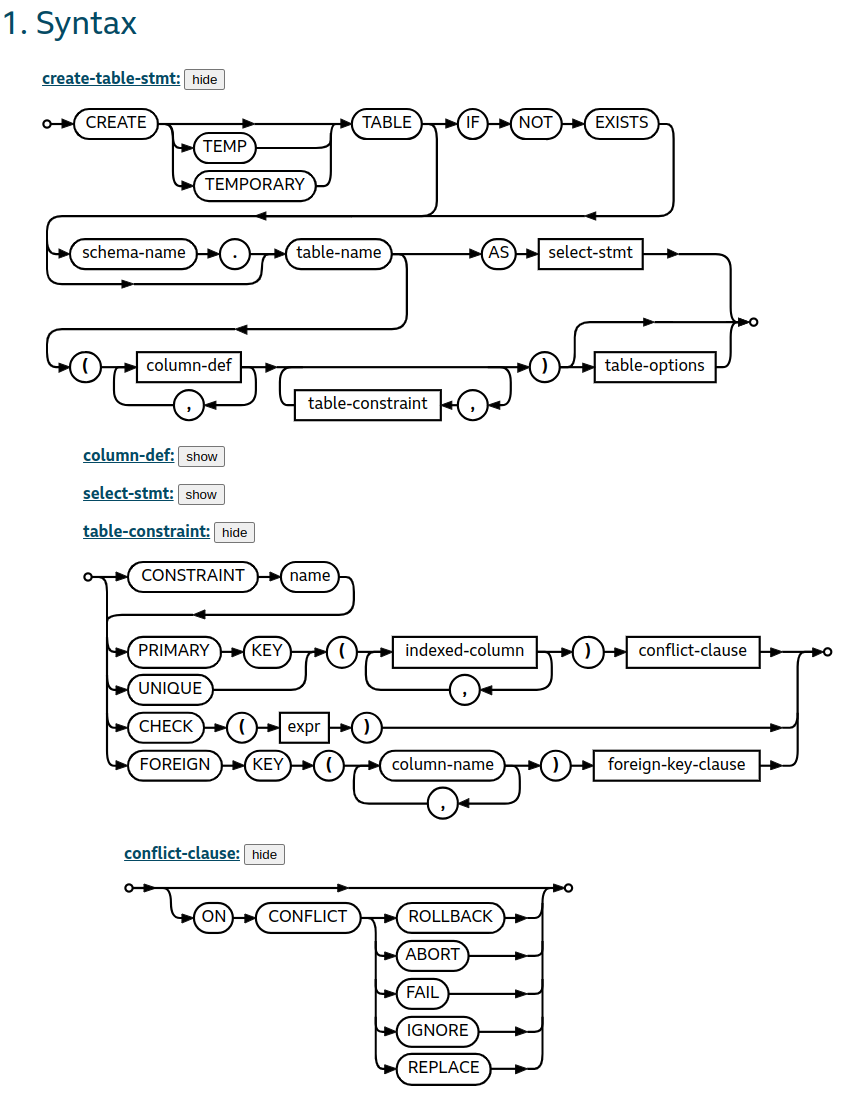
So, we added a constraint:
CREATE TABLE students(
  s_id        INTEGER,
  s_name      TEXT,
  gpa         REAL CHECK (gpa BETWEEN 1.0 AND 4.0),
  PRIMARY KEY (s_id)
);
This could also have been declared as:
CREATE TABLE students(
  s_id        INTEGER,
  s_name      TEXT,
  gpa         REAL,
  PRIMARY KEY (s_id),
  CONSTRAINT  valid_gpa
              CHECK (gpa BETWEEN 1.0 AND 4.0)
              ON CONFLICT ROLLBACK
);
Here we can be more explicit about what we want to happen if the constraint is violated (I also think it's nice to have all constraints gathered at the bottom of the table definition, but YMMV).
So I updated create-colleges-db.sql, and recreated the database (the $ is just the CLI prompt, it doesn't belong to the command):
$ sqlite3 colleges.sqlite < create-colleges-db.sql
$ sqlite3 colleges.sqlite
SQLite version 3.51.2 2026-01-09 17:27:48
Enter ".help" for usage hints.
sqlite> .mode column
We first looked at the current data:
SELECT    *
FROM      students;
s_id  s_name  gpa
----  ------  ---
123   Amy     3.9
234   Bob     3.6
345   Craig   3.5
456   Doris   3.9
543   Craig   3.4
567   Edward  2.9
654   Amy     3.9
678   Fay     3.8
765   Jay     2.9
789   Gary    3.4
876   Irene   3.9
987   Helen   3.7
and then tried to insert an invalid gpa:
sqlite>
INSERT
INTO    students(s_name, gpa)
VALUES  ('Bob', 0.6);
Runtime error: CHECK constraint failed: gpa BETWEEN 1.0 AND 4.0 (19)
The database doesn't accept the new student, and we can't update a gpa to an invalid value either:
sqlite> UPDATE students SET gpa = 4.1 WHERE s_id = 123;
Runtime error: CHECK constraint failed: gpa BETWEEN 1.0 AND 4.0 (19)
So we no longer risk having students with erroneous grades in our database – the database takes care of it by itself!
We then looked at a problem which at first may look similar:
Exercise: Make sure no one lowers the gpa of a student in the students table.
To do this, we need two values: the new value of the gpa, but also the previous value – the problem is that when we define a constraint as we did above, we only have access to the value we want to save, not the previous value.
So we started looking at triggers, and went through some slides (you can also look through the SQLite documentation for triggers).
Using triggers to keep table data valid
When we write a trigger for an update, we'll have access to two 'rows':
OLD: The row which we're about to update – in this case we can check the previous value ofgpausingOLD.gpaNEW: The row as we want it to look after the update – in this case we can check the newgpausingNEW.gpa.
If the new gpa is less than the previous gpa, we should rollback the transaction:
CREATE TRIGGER dont_lower_grades
BEFORE UPDATE ON students
WHEN NEW.gpa < OLD.gpa
BEGIN
  SELECT RAISE (ROLLBACK, 'Thou shalt not lower grades!');
END;
In this case we could have used either BEFORE UPDATE or AFTER UPDATE, the results would have been the same (but it feels unnecessary to wait until after we've first tried to insert the new row).
We can solve this without using the WHEN condition, instead using a SELECT CASE WHEN statement inside the BEGIN-END part of the trigger, but it's probably harder to understand (you can interpret this as if we did a WHEN TRUE, and then had the logic for when to roll back in the SELECT CASE WHEN statement):
CREATE TRIGGER dont_lower_grades
BEFORE UPDATE ON students
BEGIN
  SELECT CASE NEW.gpa < OLD.gpa
         WHEN TRUE THEN
             RAISE (ROLLBACK, 'Thou shalt not lower grades!')
         END;
END;
We then discussed how to make sure that students don't apply for more than two majors at any given college.
We started with some scaffolding – I said that our trigger would end up looking something like:
DROP TRIGGER IF EXISTS limit_applications;
CREATE TRIGGER limit_applications
BEFORE INSERT ON applications
WHEN
  -- todo
BEGIN
  SELECT RAISE (ROLLBACK, 'Too many applications to the same college');
END;
Here we want to check that the student in the new application (called NEW) will not have too many applications already, and we came up with the following query to see the current value:
SELECT   count()
FROM     applications
WHERE    s_id = NEW.s_id
         AND c_name = NEW.c_name
In the trigger, we want to make sure that this value isn't bigger than 1 before we insert a new application:
DROP TRIGGER IF EXISTS limit_applications;
CREATE TRIGGER limit_applications
BEFORE INSERT ON applications
WHEN
  (SELECT   count()
   FROM     applications
   WHERE    s_id = NEW.s_id
            AND c_name = NEW.c_name) > 1
BEGIN
  SELECT RAISE (ROLLBACK, 'Too many applications to the same college');
END;
Here there is a difference between using BEFORE INSERT and AFTER INSERT – above we checked the number of applications before we made the insertion, if we had used AFTER INSERT, we can write:
DROP TRIGGER IF EXISTS limit_applications;
CREATE TRIGGER limit_applications
AFTER INSERT ON applications
WHEN
  (SELECT   count()
   FROM     applications
   WHERE    s_id = NEW.s_id
            AND c_name = NEW.c_name) > 2
BEGIN
  SELECT RAISE (ROLLBACK, 'Too many applications to the same college');
END;
since the new row would be counted (sometimes it's easier to check the constraint after we've tried to insert the new row, but in this case trying to insert first is a bit unnecessary).
If we add the limit_applications trigger to the end of our set-up script (create-colleges-db.sql), we'd accept all the applications we saw previously, but if we add the trigger before the INSERT INTO applications statements, it would be in effect while we added our applications.
What happens then depends on how we handle the inserts which triggers our trigger – above we did a ROLLBACK, and I showed a slide which described the alternatives we have:
- A
ROLLBACK: this stops the current transaction, and undoes everything in it. - An
ABORT: in this case the current statement would be aborted, but we'd continue our ongoing transaction. - An
IGNORE: this would mean that just the misbehaving row would be ignored, but that the remaining rows in the current statement would get processed, and the transaction would continue.
The script in create-colleges-db.sql was created by sqlite3 (using ".dump"), and it begins with:
PRAGMA foreign_keys=OFF;
BEGIN TRANSACTION;
CREATE TABLE students (
  s_id         INTEGER,
  s_name       TEXT,
  gpa          REAL CHECK (gpa BETWEEN 1.0 AND 4.0),
  PRIMARY KEY  (s_id)
);
...
The script is supposed to run in sqlite3, and I said that the sqlite3 REPL normally was in AUTOCOMMIT mode (see the slides), but the BEGIN TRANSACTION creates a new transaction, so everything up until a COMMIT statement (and there is one at the end of the script) will happen inside a transaction.
In the script we insert into the applications table using several INSERT statements like:
INSERT INTO applications VALUES(123,'Stanford','CS','Y');
INSERT INTO applications VALUES(123,'Stanford','EE','N');
INSERT INTO applications VALUES(123,'Berkeley','CS','Y');
INSERT INTO applications VALUES(123,'Cornell','EE','Y');
INSERT INTO applications VALUES(234,'Berkeley','biology','N');
...
and if one of these insertions triggers the limit_applications trigger, we would roll back everything in our transaction.
It so happens that Craig (with s_id 345) applies to Cornell three times, and that makes the trigger rollback the whole transaction, which in turn means that all CREATE TABLE statements, all insertions, and even the trigger itself would be rolled back, and we'd end up with an empty database.
If we instead had written the limit_applications trigger as (observe that we now use ABORT to handle the illegal insertion):
DROP TRIGGER IF EXISTS limit_applications;
CREATE TRIGGER limit_applications
AFTER INSERT ON applications
WHEN
  (SELECT   count()
   FROM     applications
   WHERE    s_id = NEW.s_id
            AND c_name = NEW.c_name) > 2
BEGIN
  SELECT RAISE (ABORT, 'Too many applications to the same college');
END;
This would mean that the INSERT statements which triggers limit_applications would be aborted, but that the transaction would continue, so everything but the 'illegal' insertions would end up in our database.
There is another, less verbose way to write the INSERT statement:
INSERT INTO applications
VALUES      (123,'Stanford','CS','Y'),
            (123,'Stanford','EE','N'),
            (123,'Berkeley','CS','Y'),
            (123,'Cornell','EE','Y'),
            (234,'Berkeley','biology','N'),
            ...
This is just one statement (as opposed to the many INSERT statements we had above), and in this case an ABORT would mean that all insertions into applications would get aborted, but that the rest of the database would be initiated (so, we would end up with the same database as before, but without applications).
This is where IGNORE is useful, if we had written our trigger as (for some reason we can't have a textual description when we raise IGNORE):
DROP TRIGGER IF EXISTS limit_applications;
CREATE TRIGGER limit_applications
AFTER INSERT ON applications
WHEN
  (SELECT   count()
   FROM     applications
   WHERE    s_id = NEW.s_id
            AND c_name = NEW.c_name) > 2
BEGIN
  SELECT RAISE (IGNORE);
END;
This would only affect the 'offending' row, so all valid insertions would survive, and we'd end up with the same database as when we had many INSERT statements and used ABORT.
Avoiding 'loose threads' in our foreign keys
In our applications table, we have a FOREIGN KEY to students(s_id):
CREATE TABLE applications (
  s_id         INTEGER,
  c_name       TEXT,
  major        TEXT,
  decision     CHAR DEFAULT ('N'),
  PRIMARY KEY  (s_id, c_name, major),
  FOREIGN KEY  (s_id) REFERENCES students(s_id),
  FOREIGN KEY  (major, c_name) REFERENCES programs(major, c_name)
);
and this means that we can't remove a student which has applications in the applications table:
sqlite> DELETE FROM students WHERE s_id = 123;
Runtime error: FOREIGN KEY constraint failed (19)
But we saw than when we define our applications table, we have the option to automatically remove any applications for a removed student:
CREATE TABLE applications (
  s_id         INTEGER,
  c_name       TEXT,
  major        TEXT,
  decision     CHAR DEFAULT ('N'),
  PRIMARY KEY  (s_id, c_name, major),
  FOREIGN KEY  (s_id) REFERENCES students(s_id) ON DELETE CASCADE,
  FOREIGN KEY  (major, c_name) REFERENCES programs(major, c_name)
);
So we recreated our database with this definition, and deleted Amy, and all her applications went away:
sqlite> SELECT * FROM applications WHERE s_id = 123;
s_id  c_name    major  decision
----  --------  -----  --------
123   Berkeley  CS     Y
123   Cornell   EE     Y
123   MIT       CS     N
123   Stanford  CS     N
123   Stanford  EE     N
sqlite> DELETE FROM students WHERE s_id = 123;
sqlite> SELECT * FROM applications WHERE s_id = 123;
sqlite>
So, once again, the database keeps itself in a consistent state using constraints and triggers.
Add some logging
The next thing we wanted to do was to get some kind of 'log' of all updates of the students' grades.
Time was running low at this point, but we would start by defining a new table, which has four columns:
- the time for the update (as a
DATETIME), and a description of the update (student id, previous gpa, and new gpa):
DROP TABLE IF EXISTS updated_gpas;
CREATE TABLE updated_gpas (
  s_id          INT,
  previous_gpa  REAL,
  updated_gpa   REAL
  update_time   DATETIME DEFAULT (DATETIME('now'))
);
We have no primary key in this table, it's just meant to be a log of events (there is no need to make sure the rows are unique).
Now we can insert a trigger for updates of gpa in students – this time I look at updates of a specific attribut (gpa) in a specific table (students):
DROP TRIGGER IF EXISTS log_update_students_gpas;
CREATE TRIGGER  log_update_students_gpas
BEFORE UPDATE OF gpa ON students
BEGIN
  INSERT
  INTO    updated_gpas(s_id, previous_gpa, updated_gpa)
  VALUES  (OLD.s_id, OLD.gpa, NEW.gpa);
END;
Every update we make will generate a row in our updated_gpas table, with a timestamp and description of the change
If we run:
UPDATE   students
SET      gpa = gpa * 1.1;
we would violate our valid_gpa constraint, and the whole update statement would be rolled back – this means that our updated_gpas will be empty (observe that it's only one statement, and that the SQLite CLI has autocommit turned on, but that makes no difference if the only statement we run initiates a rollback).
If we make sure not to update to invalid grades, e.g.:
UPDATE   students
SET      gpa = min(4.0, gpa * 1.1);
our update would be committed, and we can see our log:
SELECT   *
FROM     updated_gpas
This produces something like:
sqlite> SELECT * FROM updated_gpas;
update_time          s_id  previous_gpa  updated_gpa
-------------------  ----  ------------  -----------
2026-02-16 14:44:24  123   3.9           4.0
2026-02-16 14:44:24  234   3.6           3.96
2026-02-16 14:44:24  345   3.5           3.85
2026-02-16 14:44:24  456   3.9           4.0
2026-02-16 14:44:24  543   3.4           3.74
2026-02-16 14:44:24  567   2.9           3.19
2026-02-16 14:44:24  654   3.9           4.0
2026-02-16 14:44:24  678   3.8           4.0
2026-02-16 14:44:24  765   2.9           3.19
2026-02-16 14:44:24  789   3.4           3.74
2026-02-16 14:44:24  876   3.9           4.0
2026-02-16 14:44:24  987   3.7           4.0
Using triggers from Python code
One (of many) great things with triggers is that they let us move many things from our 'external' code into the database, where we can also reuse it. In lecture 6 and 7 we implemented a program which lets us admit students to a given program (major@college):
import sqlite3
import sys


db = sqlite3.connect('colleges.sqlite')
db.execute('PRAGMA foreign_keys = ON')


def main():
    major, college = sys.argv[1:]
    c = db.cursor()
    c.execute(
        '''
          WITH
             enrollments(enrollment) AS (
                SELECT    enrollment
                FROM      programs
                WHERE     major = ? AND c_name = ?
             ),
             admissions(admitted) AS (
                SELECT    count()
                FROM      applications
                WHERE     major = ? AND c_name = ? AND
                          decision = 'Y'
            )
          SELECT   enrollment, admitted
          FROM     enrollments
                   CROSS JOIN admissions;
          ''',
          [major, college, major, college]
    )
    enrollment, admitted = c.fetchone()
    print(f'  {admitted} of {enrollment} already admitted')

    c.execute(
        '''
        SELECT    s_id,
                  s_name,
                  gpa,
                  rank() OVER (ORDER BY gpa DESC)
        FROM      applications
                  JOIN students USING (s_id)
        WHERE     major = ? AND c_name = ?
                  AND decision = 'N'
        ''',
        [major, college]
    )
    for id, name, gpa, rank in c:
        print(f'  {rank:3d} {gpa:4.2f} - {id} ({name})')

    count = int(input('How many do you want to admit? '))
    c.execute(
        '''
        WITH
            waitlist(s_id, ranking) AS (
                SELECT  s_id, row_number() OVER (ORDER BY gpa DESC, random())
                FROM    applications
                        JOIN students USING (s_id)
                WHERE   major = :major AND c_name = :college AND decision = 'N'
            ),
            admitted(s_id) AS (
                SELECT  s_id
                FROM    waitlist
                WHERE   ranking <= :count
            )
        UPDATE   applications
        SET      decision = 'Y'
        WHERE    s_id IN admitted AND major = :major AND c_name = :college
        ''',
        {
            "major": major,
            "college": college,
            "count": count
        }
    )
    db.commit()


main()
Here we show how many students we have admitted, and how many students we're allowed to admit, but the program does nothing to enforce the limit.
We could quite easily have fixed this in our Python code, but much better is to make the database itself make sure it is in a consistent state. So, we add a trigger which won't accept more students into a program than we're allowed to enroll:
CREATE TRIGGER enforce_program_enrollment_limitations
BEFORE UPDATE OF decision ON applications
WHEN
  (
    SELECT    count()
    FROM      applications
    WHERE     major = NEW.major AND c_name = NEW.c_name AND decision = 'Y'
  )
  >=
  (
    SELECT    enrollment
    FROM      programs
    WHERE     major = NEW.major AND c_name = NEW.c_name
  )
BEGIN
  SELECT RAISE (ROLLBACK, 'Enrollment exceeding limit');
END;
Using a try-except statement in our Python code, we can catch potential over-crowding of programs:
import sqlite3
import sys


db = sqlite3.connect('colleges.sqlite')
db.execute('PRAGMA foreign_keys = ON')


def main():
    major, college = sys.argv[1:]
    c = db.cursor()

    # ... as above ...

    count = int(input('How many do you want to admit? '))
    try:
        c.execute(
            '''
            WITH
                waitlist(s_id, ranking) AS (
                    SELECT  s_id, row_number() OVER (ORDER BY gpa DESC, random())
                    FROM    applications
                            JOIN students USING (s_id)
                    WHERE   major = :major AND c_name = :college AND decision = 'N'
                ),
                admitted(s_id) AS (
                    SELECT  s_id
                    FROM    waitlist
                    WHERE   ranking <= :count
                )
            UPDATE   applications
            SET      decision = 'Y'
            WHERE    s_id IN admitted AND major = :major AND c_name = :college
            ''',
            {
                "major": major,
                "college": college,
                "count": count
            }
        )
        db.commit()

    except sqlite3.IntegrityError as e:
        db.rollback()
        print(f"We're not allowed to do that: {str(e)}")

main()
There is a problem with this solution, though.
During lecture 10 we experimented with this program, and although the trigger makes sure that we don't admit more students than we're allowed to admit, the UPDATE statement above can potentially enter them in the wrong order if we try to enter too many, so we need to be a bit more careful.
One simple way to handle this would be to just make sure count is a safe value, e.g., by checking it with something like:
count = max(0, int(input('How many do you want to admit? ')))
count = min(enrollment - admitted, count)
Doing this wouldn't even require our trigger.
Another way to do it, which could actually use our trigger, would be to fetch the ordered waitlist in our Python code, and then loop through it one element at a time (I show this just because it illustrates the difference between ROLLBACK and IGNORE below):
try:
    c.execute(
        '''
        WITH
            waitlist(s_id, gpa, rnd) AS (
                SELECT  s_id,
                        gpa,
                        random()
                FROM    applications
                        JOIN students USING (s_id)
                WHERE   major = :major AND
                        c_name = :college
                        AND decision = 'N'
            )
        SELECT    s_id
        FROM      waitlist
        ORDER BY  gpa DESC, rnd
        ''',
        {
            "major": major,
            "college": college
        }
    )
    waitlist = [s_id for s_id, in c]
    for s_id in waitlist[:count]:
        c.execute(
            '''
            UPDATE applications
            SET    decision = 'Y'
            WHERE  s_id = :s_id AND
                   major = :major AND
                   c_name = :college
            ''',
            {
                "s_id": s_id,
                "major": major,
                "college": college
            }
        )
    db.commit()

except sqlite3.IntegrityError as e:
    db.rollback()
    print(f"We're not allowed to do that: {str(e)}")
If we use this with a ROLLBACK in our trigger, the program will not accept any student if count is too big – the ROLLBACK would break the iteration over the waitlist before we reach db.commit().
If we really want to admit as many students as possible, we have two alternatives:
We can move the
db.commit()into the loop:for s_id in waitlist[:count]: c.execute( ''' UPDATE applications SET decision = 'Y' WHERE s_id = :s_id AND major = :major AND c_name = :college ''', { "s_id": s_id, "major": major, "college": college } ) db.commit()
This would still generate an error which will be caught in the
exceptstatement, but all updates until that point will be committed (sincedb.commit()is called inside the loop).We can change the trigger, so that it instead of a
ROLLBACKusesIGNORE:CREATE TRIGGER enforce_program_enrollment_limitations BEFORE UPDATE OF decision ON applications WHEN ( SELECT count() FROM applications WHERE major = NEW.major AND c_name = NEW.c_name AND decision = 'Y' ) >= ( SELECT enrollment FROM programs WHERE major = NEW.major AND c_name = NEW.c_name ) BEGIN SELECT RAISE (IGNORE); END;
This way we don't have to move our
db.commit()into the loop, it would just ignore those inserts which would overflow the limit (observe that we're not in auto-commit mode, but thatIGNOREjust ignores those rows which would break the condition in theWHENclause of the trigger, so the transaction finishes without interruption).
BTW: We could amend our trigger with:
CREATE TRIGGER enforce_program_enrollment_limitations
BEFORE UPDATE OF decision ON applications
WHEN
  (
    SELECT    count()
    FROM      applications
    WHERE     major = NEW.major AND c_name = NEW.c_name AND decision = 'Y'
  )
  >=
  (
    SELECT    enrollment
    FROM      programs
    WHERE     major = NEW.major AND c_name = NEW.c_name
  )
  OR
  (
    SELECT    gpa
    FROM      students
    WHERE     s_id = NEW.s_id
  )
  <
  (
    SELECT    max(gpa)
    FROM      applications
              JOIN students USING (s_id)
    WHERE     major = NEW.major AND c_name = NEW.c_name AND decision = 'N'
  )
BEGIN
  SELECT RAISE (IGNORE);
END;
but that would still not fix the problem with the order of the updates in case we tried to let in too many students in a single UPDATE as above (some student who is supposed to be admitted in one UPDATE call could be blocked by another student with a higher gpa who hasn't been admitted yet, we also don't use the generated random numbers when we do it this way).