EDAF75 - notebook for lab 1
Author: Christian Söderberg
SQL queries
This lab is meant to be run as a jupyter notebook, you can download it from the course website (the lab1.zip archive contains the notebook and the database).
To start your notebook, first you have to unzip lab1.zip, and then start jupyter where it can find your unpacked files.
If you install jupyter using pixi (which is what I would recommend), then you can use the following incantation (this information is obviously unnecessary if you're already running the notebook, but can be useful if you're reading this as a regular webpage…):
$ unzip lab1.zip
$ cd lab1
$ pixi init
$ pixi add jupyterlab jupysql
$ pixi run jupyter lab
This should start jupyter in a browser tab, and there you can click
lab1.ipynb.
If you already have installed jupyter in some other way, you can just start it inside the lab1 directory.
Background
We have a database to handle the academic achievements of students at LTH – in it we have four tables:
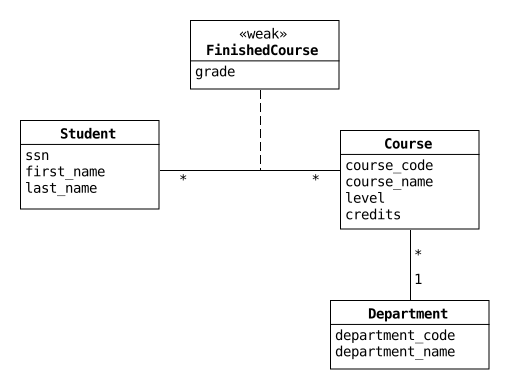
studentsssn: social security number (personnummer)first_name: first name (duh!)last_name: last name
departmentsdepartment_code: unique code for each department, such aseda,fma, …department_name: the name of the department, in Swedish
coursescourse_code: course code (likeedaf75)course_name: the name of the course, in Swedish (like "Databasteknik")department_code: the department giving the courselevel: the course level – can be either "G1", "G2", or "A"credits: the number of credits for the course (like 7.5 foredaf75)
finished_coursesssn: thessnof the student who has finished a coursecourse_code: thecourse_codefor the finished coursegrade: the grade for the student finishing the course
Some sample data:
ssn first_name last_name----------- ---------- ---------19950705-2308 Anna Johansson19930702-3582 Anna Johansson19911212-1746 Emma Alm... ... ...department_code department_name--------------- ----------------------------------------eda Datavetenskapedi Informationsteorieem Elektrisk mätteknik... ...course_code course_namedepartment_code level credits----------- --------------------- --------------- -------–—EDA016 Programmeringsteknik eda G1 7.5EDA031 C++ - programmering eda G2 7.5EDA040 Realtidsprogrammering eda G2 6.0... ... ... ... ...ssn course_code grade----------- ----------- -----19950705-2308 EITN35 519950705-2308 ESS050 319950705-2308 ETIN70 4... ... ...
The tables have been created with the following SQL statements:
CREATE TABLE students (ssn CHAR(11),first_name TEXT NOT NULL,last_name TEXT NOT NULL,PRIMARY KEY (ssn));CREATE TABLE departments (department_code TEXT,department_name TEXT,PRIMARY KEY (department_code));CREATE TABLE courses (course_code CHAR(6),course_name TEXT NOT NULL,department_code TEXT,level CHAR(2),credits DOUBLE NOT NULL CHECK (credits > 0),PRIMARY KEY (course_code),FOREIGN KEY (department_code) REFERENCESdepartments(department_code));CREATE TABLE finished_courses (ssn CHAR(11),course_code CHAR(6),grade INTEGER NOT NULL CHECK (grade >= 3 AND grade<= 5),PRIMARY KEY (ssn, course_code),FOREIGN KEY (ssn) REFERENCES students(ssn),FOREIGN KEY (course_code) REFERENCEScourses(course_code));
All courses offered at the "Computer Science and Engineering" program at LTH during the academic year 2013/14 are in the table courses.
Also, the database has been filled with made up data.
SQL statements like the following have been used to insert the data:
INTO students(ssn, first_name, last_name)VALUES ('19950705-2308', 'Anna', 'Johansson'),('19930702-3582', 'Anna', 'Johansson'),('19911212-1746', 'Emma', 'Alm'),('19910707-3787', 'Emma', 'Nilsson'),...
Assignments
As said above, this lab is designed to be run as a jupyter notebook.
If you haven't got jupyter running, you can run the sql-commands for the problems below interactively inside sqlite3, or as a script file with all your commands, or inside some IDE, like DB Browser for SQLite.
If you're running the lab as a notebook, evaluate the following cells before you begin:
%load_ext sql
If we install using pixi as show above, we're going to use jupysql (instead of ipython-sql), and we'll get a default limit of 10 rows for any query – to turn this limit off we can write:
%config SqlMagic.displaylimit = None
We can now load the lab database:
%sql sqlite:///lab1.sqlite
The tables students, departments, courses and finished_courses are already in your database, you can see some of their contents by running the cells below:
%%sql
SELECT  *
FROM    students
LIMIT   4
%%sql
SELECT  *
FROM    departments
LIMIT   4
%%sql
SELECT  *
FROM    courses
LIMIT   4
%%sql
SELECT  *
FROM    finished_courses
LIMIT   4
If you inadvertently change the contents of the tables, you can always recreate the them with the following command (it must be run at the command line):
$ sqlite3 lab1.sqlite < create-lab1-db.sqlWarm up problems
The problems in this section will not be reviewed during the lab session, they're just to get you up to speed.
Problem 1 (practice)
What are the names (first name and last name) of all the students?
%%sql
Now sort the names, first by last name and then by first name:
%%sql
When you get it to work, experiment by listing only the 10 first students (alphabetically), then try to list only students 11-20, etc.:
%%sql
Problem 2 (practice)
What are the names of the students who were born in 1985?
%%sql
Hint: the substring function can be useful (it also goes by the name
substr).
Problem 3 (practice)
The penultimate digit in the social security number is even for females, and odd for males. List the first names of all female students in our database alphabetically.
%%sql
Now try to output each name only once (so, no duplicates).
%%sql
Now try to output the number of distinct names in the listing of female students above, using count. It turns out that this is a bit tricky, we need to make sure we use the word DISTINCT in the right place (look carefully in the documentation).
%%sql
Write a query to show the number of female students, and the number of male students. We want to get the following output:
| Gender | Count |
|---|---|
| female | 25 |
| male | 47 |
To do this, we can use the CASE - WHEN construct (see lecture 1) – in this case we want to create the two categories 'female' and 'male', and then find a way to count the number of rows in each category.
%%sql
Problem 4 (practice)
In the next few queries, we'll look at the results of the student with the social security number 19910101-1234 – to make things a lot easier, start by creating a VIEW with all his results.
%%sql
DROP VIEW IF EXISTS ...;
CREATE VIEW ... AS
Make sure the view contains all data pertinent to the student in question (it will make the following queries very simple).
Which courses (course codes only) have been taken by the student?
%%sql
What are the names of these courses, and how many credits do they give?
%%sql
How many credits has the student taken?
%%sql
What is the student's grade average? It turns out that there are actually (at least) two different averages at play here:
the unweighted average, i.e., just the average of all the students grades (no matter how many credits each course gives), and
the weighted average, where we use the credits for a course as a weight.
First the unweighted average:
%%sql
And then the weighted average (feel free to ask me about this during QA sessions, if you get stuck):
%%sql
Hint: If you've created a proper view above, we'll get a 'table' with
one row for each course the student has finished, and each row will
contain information about grades and credits for the finished course.
If we use arithmetic operations in a select statement, and then use an
aggregate function around that operation, we'll apply the aggregate
function to each value the operation returns (so, e.g., a sum over a
product will be a scalar product).
Now drop the view:
%%sql
Review problems
Problem 5 - REVIEW
List the 10 first students in birthday order (not by age, just the birthday – the birthday is a part of the social security number).
The output should begin with:
| Ssn | First name | Last name |
|---|---|---|
| 19910101-1234 | Peter | Solberg |
| 19890103-1256 | Johan | Brattberg |
| 19950125-1153 | Magnus | Hultgren |
| 19900129-3374 | Henrik | Gustavsson |
| 19860206-1065 | Eva | Hjort |
Hint: You can use the substring function to pick out the birthday from the ssn.
%%sql
Then list all shared birthdays, order first by how many students share the birthday, then by the birthday itself (alphabetically):
%%sql
The output should be:
| Birthday | Nbr of people |
|---|---|
| 0206 | 3 |
| 0308 | 2 |
| 0819 | 2 |
| 0915 | 2 |
| 1015 | 2 |
| 1030 | 2 |
Problem 6 – REVIEW
How many courses are there for each level (G1, G2, and A)?
%%sql
For all levels, list all departments who have more than 5 courses at that level.
%%sql
The output should be something like this (but it's totally fine if you list A-courses before the G1/G2 courses).
| Nivå | Institution | Antal |
|---|---|---|
| G1 | Språk och litteraturcentrum | 12 |
| G1 | Elektro- och informationsteknik | 6 |
| G2 | Elektro- och informationsteknik | 15 |
| G2 | Datavetenskap | 13 |
| A | Elektro- och informationsteknik | 26 |
| A | Matematik | 16 |
| A | Datavetenskap | 14 |
| A | Matematisk statistik | 7 |
| A | Reglerteknik | 6 |
Optional: If you really want the A-level courses listed after the G1/G2 in the output (but you're not required to!), you can use a WITH statement defining a table with two columns, a level and the corresponding 'order' (so, G1 has order 1, G2 has order 2 and A has order 3), and then join in this ordering and use it for ordering the rows in the output.
To do this you can use a WITH with a VALUES body (see the SQLite documentation for the WITH clause).
Problem 7 - REVIEW
For the ten departments which offer the most total credits (for its courses in this database) – output the name of the department, the total offered credits, and the number of courses, order by credits, with highest total first:
%%sql
The output should begin something like:
| Institution | Totalpoäng | Antal kurser |
|---|---|---|
| Elektro- och informationsteknik | 332.0 | 47 |
| Datavetenskap | 216.0 | 32 |
| Matematik | 160.0 | 26 |
| Språk och litteraturcentrum | 106.5 | 13 |
| Matematisk statistik | 84.0 | 11 |
| ... | ... | ... |
Problem 8 - REVIEW
Which students (ssn and full name) have taken 0 credits – list the students in alphabetical order (last name and then first name)?
This problem can be solved in several ways, first do it with an outer join:
%%sql
Do the same thing using a subquery:
%%sql
Now just copy/paste one of your solutions above, and use a window function to add a column which shows the 'age order' of all the students in the list, the oldest student should get number 1 (but still be listed in alphabetical order).
%%sql
The output should be something like:
| Personnummer | Namn | Åldersordning |
|---|---|---|
| 19891220-1393 | Erik Andersson | 5 |
| 19900313-2257 | Erik Andersson | 7 |
| 19891007-3091 | Roger Brorsson | 4 |
| ... | ... | |
| 19850517-2597 | Filip Persson | 1 |
Problem 9 - REVIEW
List the names and average grades of the 10 students with the highest grade average? You can use the unweighted average.
%%sql
The output should begin with:
| Personnummer | Förnamn | Efternamn | Snittbetyg |
|---|---|---|---|
| 19861103-2438 | Bo | Ek | 4.35 |
| 19910308-1826 | Helena | Troberg | 4.31 |
| 19931213-2824 | Elaine | Robertson | 4.24 |
| 19930702-3582 | Anna | Johansson | 4.23 |
| 19931208-3605 | Ylva | Jacobsson | 4.22 |
| ... | ... | ... | ... |
It's OK to use more digits in the output, but using the format-function it's pretty easy to get the numbers formatted as above.
Problem 10 - REVIEW
List the social security number and total number of credits for all
students – order by total credits, descending.
Students with no credits
should be included in the listing, with 0 credits (not NULL).
Use an outer JOIN to solve the problem – you might want to use the
function coalesce(v1, v2, ...); it returns the first value which is
not NULL, so coalesce(avg(grade), 0) would give 0 if the were no
grades (i.e., if grade were NULL), you can also try the ifnull
function.
%%sql
Problem 11 - REVIEW
Do all students have unique names (first name and last name)? If not, show the full name and social security number for all students who have a namesake.
As usual there are several ways of solving this, solve it using a
WITH-statement where you create a 'table' with all duplicate names,
and then:
Use a JOIN:
%%sql
Use a subquery:
%%sql