You will in this part implement a REST API for a subset of the Krusty database. You are given a skeleton Eclipse project that you can start from (download krusty-skeleton.zip).
A REST server (or REST service) is a program which runs on a computer, waits for requests, and sends back responses – normally it uses the HTTP(s) protocol for its communication. In lecture 7, REST was introduced and we looked at a REST server that handled information about bank accounts (see slides and example project for bank accounts).
The REST server will be implemented using the framework Spark (shown during a lecture) and the responses will be encoded as JSON objects.
Download the provided Eclipse project (krusty-skeleton.zip) and unzip it, and then import it into Eclipse. A project can be imported in Eclipse by File -> Import... -> General -> Existing Projects into Workspace -> Next (or similar), and then select the root directory as the unzipped directory.
The project is a Maven/Gradle project, which makes dependencies to external libraries easy to manage. This will make Eclipse to download all dependencies when opening the project automatically. This is also why the directory structure looks like it does.
You will implement the following REST endpoints:
  GET /customers           // Get all customers
  GET /raw-materials       // Get all raw materials
  GET /cookies             // Get all cookies
  GET /recipes             // Get all recipes
  GET /pallets             // Get all pallets - uses query parameters for filtering

  POST /reset              // Reset the database - see below for details
  POST /pallets            // Create a pallet - uses query parameter for specifying cookie
The given project contains the following classes:
main.java.krusty.RESTServerDatabase.main.java.krusty.Databasemain.java.krusty.JSONizerResultSet and automatically converts it to a JSON object (as a String).test.java.krusty.KrustyTestsThe endpoints are already defined in the skeleton project and in the class RESTServer:
  private void initRoutes() {
    get("/customers", (req, res) -> db.getCustomers(req, res));
    get("/raw-materials", (req, res) -> db.getRawMaterials(req, res));
    get("/cookies", (req, res) -> db.getCookies(req, res));
    get("/recipes", (req, res) -> db.getRecipes(req, res));
    get("/pallets", (req, res) -> db.getPallets(req, res));

    post("/reset", (req, res) -> db.reset(req, res));
    post("/pallets", (req, res) -> db.createPallet(req, res));
  }
As can be seen, the endpoints are delegated to corresponding methods in the Database class. Your task is to implement these methods. For each endpoint, a request (req) and a response (res) object are passed to the database method. You will use the request object when handling query parameters, which are used for the endpoints GET /pallets and POST /pallets. The response object is not needed for any endpoint, but it can be used for setting different HTTP status codes, for example.
A common advice when coding is to work iteratively, thus, working in small steps and testing the code after each step. The provided project includes automatic tests that you can run to test your implementation, see Automatic Testing. You can also test your implementation manually, which might be more useful when you start your implementation, see Manual Testing.
There is already a web app that uses the endpoints to provide a user interface, see Web App. You can try this out when you have implemented the endspoints. The class RESTServer enables something called CORS (Cross-Origin Resource Sharing), which allows the web app to access the endpoints. However, you do not need to worry about this.
This section describes each endpoint in more detail, and gives implementation advices for some of the endpoints.
GET /customersReturns all customers, where each customer is described with a name and an address. Example response:
Note that JSON properties are case-sensitive, meaning that you should use "customers" and not "Customers", "name" and not "Name", etc. It is important that the JSON object you create use the expected property names correctly, otherwise the automatic tests and the web app will fail.
As described before, you implement this endpoint by implementing the method Database.getCustomers. This method returns a JSON object represented as a String. The parameters req and res are not needed for this endpoint. When creating JSON responses, you can use the provided class JSONizer, which takes a ResultSet and returns a JSON object as a String. Example:
public String getCustomers(Request req, Response res) {
  ...
  try (...} {
    ...
    ResultSet resultSet = ...;
    String json = JSONizer.toJSON(resultSet, "customers");
    return json;
  } catch (...) {
    ...
  }
  ...
}
Consider the following SQL query:
> SELECT name, address FROM customers;
+----------------+--------------+
| name           | address      |
+----------------+--------------+
| Finkakor AB    | Helsingborg  |
| Småbröd AB     | Malmö        |
+----------------+--------------+
Assume that the result above is represented by a ResultSet and that we call JSONizer.toJSON(resultSet, "customers"). Then we get the following String back:
{
  "customers": [
    {"name": "Finkakor AB", "address": "Helsingborg"},
    {"name": "Småbröd AB", "address": "Malmö"}
  ]
}
The method JSONizer.toJSON uses the attribute names in the SQL query when translating the ResultSet to a JSON object. If your attribute names do not reflect the expected JSON response, then you can use SQL aliases. For example, let’s assume that your attributes are called company_name and company_address, then to use the JSONizer class, we can use aliases for them to create the expected JSON response:
It is also possible to create the JSON object as a String without using the method JSONizer.toJSON, but this requires more effort.
GET /raw-materialsReturns all raw materials, where each material has a name, amount and an unit. Example response:
{
  "raw-materials": [
    {"name": "Bread crumbs", "amount": 500000, "unit": "g"},
    {"name": "Egg whites", "amount": 500000, "unit": "ml"},
    ...
  ]
}GET /cookiesReturns all cookies, where each cookie is described by a name. Example response:
GET /recipesReturns the recipes for all cookies. A recipe for a cookie is described by several entries (one entry for each ingredient). Example response:
{
  "recipes": [
    {"cookie": "Amneris", "raw_material": "Butter", "amount": 250, "unit": "g"},
    {"cookie": "Amneris", "raw_material": "Marzipan", "amount": 750, "unit": "g"},
    ...
    {"cookie": "Berliner", "raw_material": "Flour", "amount": 350, "unit": "g"},
    {"cookie": "Berliner", "raw_material": "Butter", "amount": 250, "unit": "g"},
    ...
  ]
}GET /palletsReturns all produced pallets sorted by production date (newest first). Each pallet is described by an id, cookie, production_date, customer and blocked. Example response:
{
  "pallets": [
    {"id": 1, "cookie": "Amneris", "production_date": "2019-01-01 13:00:00", "customer": "Finkakor AB", "blocked": "no"},
    {"id": 2, "cookie": "Nut ring", "production_date": "2019-01-05 15:00:00", "customer": "null", "blocked": "no"},
    ...
  ]
}
It is also possible to filter pallets based on the query parameters from, to, cookie, blocked. Examples:
GET /pallets?from=2018-01-01     // Get all pallets produced after 2018-01-01 (inclusive)
GET /pallets?to=2020-01-01       // Get all pallets produced before 2020-01-01 (inclusive)
GET /pallets?cookie=Amneris      // Get all pallets with the cookie Amneris
GET /palelts?blocked=yes         // Get all blocked pallets
Note that these filters can be combined in arbitary ways, such as:
Query parameters can be obtained from the Request object that is passed as a parameter. For example,
public String getPallets(Request req, Response res) {
  ...
  if (req.queryParams("from") != null) {
    String from = req.queryParams("from");
    // Do something with "from" here
  }
  ...
}
This code checks if the query parameter from is specified by the user and then extracts the provided value.
Since the input is given by the user (as query parameters), we need to use prepared statements to protect against SQL injections. When prepared statements are used, the SQL query needs first to be created, and then the question marks are replaced with actual values using setX methods (like setString). Since search filters can be combined in arbitary ways, we need to dynamically build the SQL query and store the provided values somehow. One way to store the values is to use an ArrayList and then iterative over it to replace the question marks, which is illustrated in the following code.
public String getPallets(Request req, Response res) {
  String sql = ...;

  ArrayList<String> values = new ArrayList<String>();
  if (req.queryParams("from") != null) {
    sql += ...;
    values.add(req.queryParams("from"));
  }
  // Check other query parameters
  ...

  try (PreparedStatement stmt = connection.prepareStatement(sql)) {
    for (int i = 0; i < values.size(); i++) {
      stmt.setString(i+1, values.get(i));
    }
    ...
  } catch (SQLException e) {
    ...
  }
}
If you represent the blocked status with a boolean attribute or with an attribute that is NULL if the pallet is blocked, then you can use the MySQL function IF(…) to return the string ‘yes’ or ‘no’ depending on the value. This is illustrated in the follwing SQL code:
Here, the attribute blocked_bool_attr is a boolean attribute, and blocked will be 'yes' if the value of blocked_bool_attr is TRUE, otherwise 'no'. It would yield similar results if the attribute represented non-blocked pallets with NULL.
POST /resetResets the database to the following values:
For this endpoint, return the following JSON object:
When you implement this endpoint, make sure that you do not duplicate code! Code duplication can be avoided, for example, by abstracting the functionality to methods which can be called with different parameters.
To clear a table in SQL, you can use TRUNCATE as following:
This will remove all rows from table t and reset the auto-increment value (if it is used).
If you are using auto-increment values as keys (surrogate keys) for ingredients or cookies, you might want to get back the created identifier. This can be done by providing the option Statement.RETURN_GENERATED_KEYS when executing the update query. This allows you to use the method getGeneratedKeys() to get back all created keys (if the query created several) as a ResultSet. Example:
try (Statement statement = connection.createStatement()) {
  String sql = ...
  statement.executeUpdate(sql, Statement.RETURN_GENERATED_KEYS);
  ResultSet rs = statement.getGeneratedKeys();
  if (rs.next()) {
    int createdId = rs.getInt(1);
    // do something with createdId - maybe return it
  }
} catch (SQLException e) {
  e.printStackTrace();
}POST /palletsCreates a new pallet, where the cookie is specified with the query parameter cookie. Example:
That should give back (if the cookie exists and can be produced):
Here, <id> should be replaced by the identifier of the produced pallet. In this assignment, you do not need to check that there are enough raw materials for producing the pallet, but the raw materials should be updated according to the recipe of the cookie. In MySQL, you can get the current date and time with the function NOW(), which can be used for the production date and time.
If the cookie does not exist, then return:
For other errors, return:
(Normally, the cookie to be produced would be specified as a JSON object, but the assignment is simplified to avoid parsing JSON objects. Thus, the cookie to be produced is specified as a query parameter instead.)
You can create another class to test the database methods directly, for example:
// In file DatabaseMain.java
public class DatabaseTest {
  public static void main(String args[]) {
    Database db = new Database();
    db.connect();
    System.out.println(db.getCustomers(null, null));
  }
}
This can be useful when developing the first endpoints (with no query parameters). Note that this does not test the endpoints - only the methods in the database class (which are used by the endpoints).
For endpoints with query parameters (GET /pallets and POST /pallets), you can create another method with the query parameters as strings and call this method instead. This is illustrated in the following code fragment:
// In file Database.java
public class Database {
  ...

  public String createPallet(Request req, Response res) {
    if (req.queryParams("cookie") != null) {
      String cookie = req.queryParams("cookie");
      return createPallet(cookie);
    } else {
      ...
    }
  }

  protected String createPallet(String cookie) {
    ...
  }
}

// In file DatabaseTest.java
public class DatabaseTest {
  public static void main(String args[]) {
    Database db = new Database();
    db.connect();
    // Call the new method and check that it returns the expected JSON
    System.out.println(db.createCookie("Amneris"));
  }
}The endpoints can be tested manually using Postman, which is a program for testing APIs.
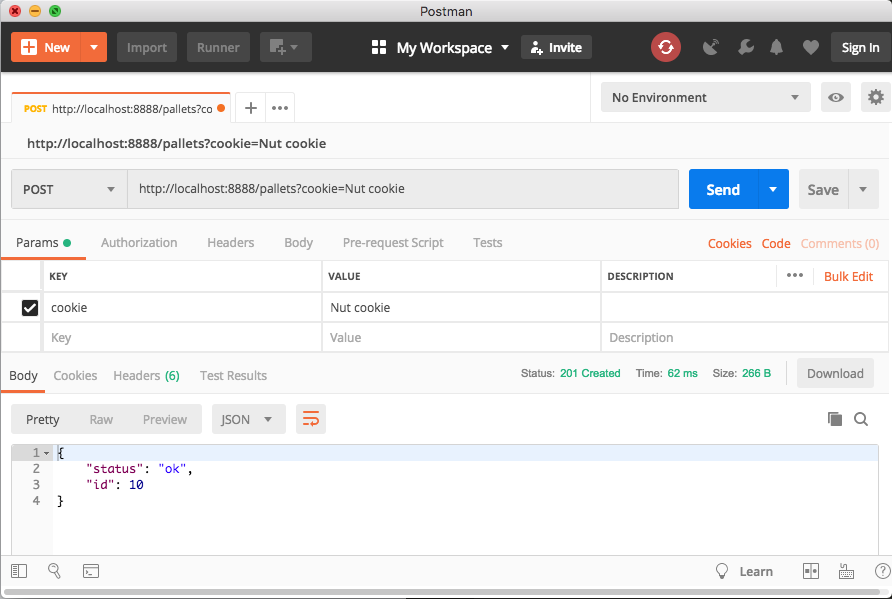
Using Postman, you can specify which HTTP method (GET or POST for our endpoints), the URL and query parameters. For example, to create a pallet with Nut cookies, you can specify:
Note that this requires the REST server to be running, which is started by running the class RESTServer (e.g., from Eclipse).
It is also possible to specify several query parameters (e.g., when searching for pallets):
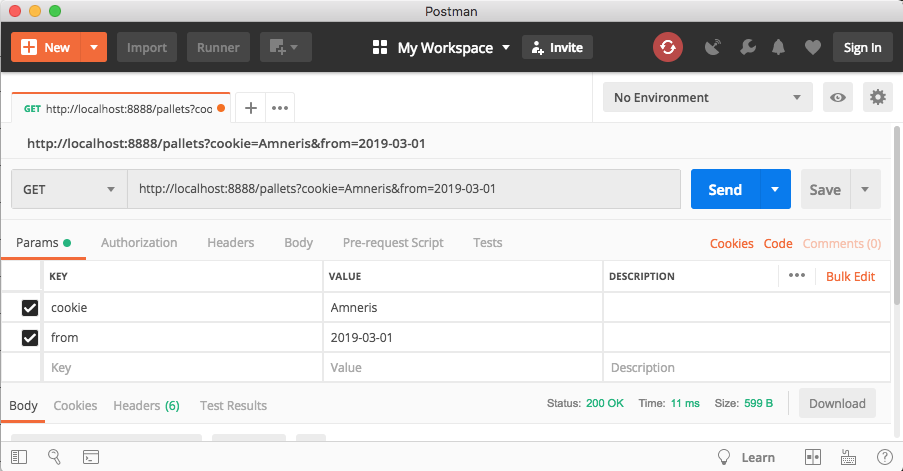
It is also possible to use the terminal program curl to test the REST endpoints manually:
$ curl -X GET http://localhost:8888/customersWhen specifying query parameters, then spaces should be replaced with %20. Example:
$ curl -X GET http://localhost:8888/pallets?cookie=Nut%20ringThe provided Eclipse project includes test cases written with JUnit (a testing framework) that tests the endpoints. The test class is located under src/test/java. Right click on the class KrustyTests and select Run As -> JUnit Test. This will run all test cases. From start, all tests will fail, as is shown in the following screenshot:
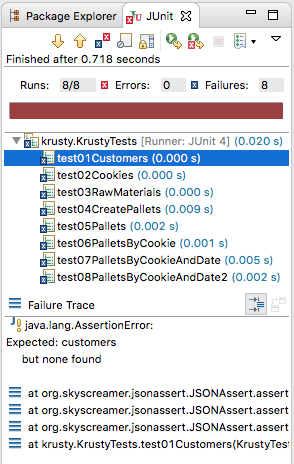
As can be seen in the bottom part of the screenshot, you can get information about why the test case failed. For the test case test01Customers, there is an property customers missing (because the database method returns an empty JSON object ({ })).
When you have implemented all endpoints correctly, all tests will pass, and each test case will have a green symbol instead, as shown in the following:
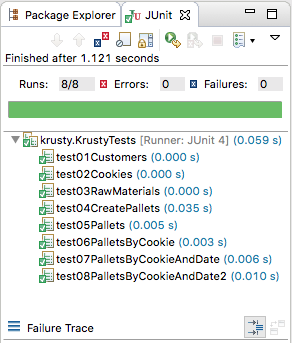
The test class will automatically start the REST server if it is not running (and stop it again afterwards if it was started). Then, before any test case is run, the test class will reset the database using the endpoint POST /reset. This to get back to the same state before running any test cases.
The test cases are written as methods using the testing framework JUnit. The expected output from the endspoints are stored in the directory src/test/resources, which you can look at if you want. These files are referenced from the test class.
There is a web app written in React that uses the REST API to provide a user interface, which can be accessed here. When you have implemented the endpoints, the user interface will look something similar to:
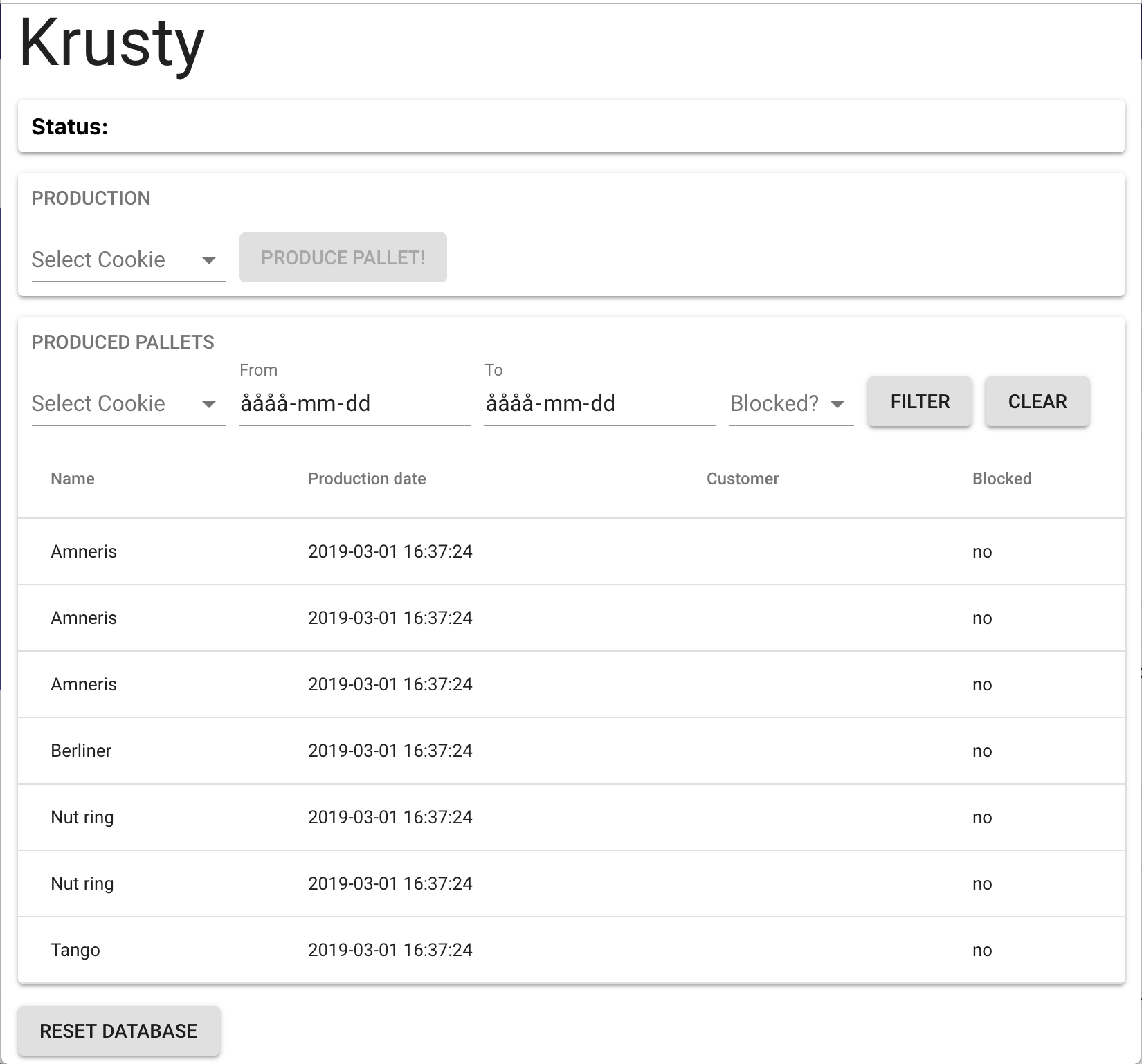
The web app uses the following endpoints:
GET /cookies - for producing pallets and pallet filteringGET /pallets - for listing pallets (with filtering if that is specified)POST /pallets - for creating new palletsPOST /reset - for resetting the databaseThe web app connects to the REST server run locally (localhost:8888). Thus, you need to start the REST server on locally if you want to use the web app (run the class RESTServer).
The source code for the web app can be found here.