Objective: you will learn to use JDBC to communicate with a database from a Java program. You will also learn something about designing a graphical user interface with the Java Swing classes.
A program which makes it possible to interactively make ticket reservations for movie performances uses the database which you developed during lab 2. The program has a graphical user interface.
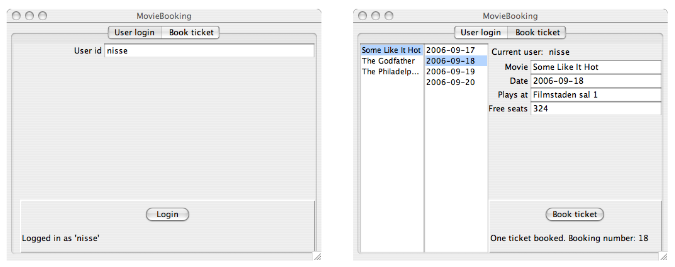
The program is a stand-alone application, and users must have the application installed on their own computers. The user interface for the program looks like this:
The window has two tabs: User login and Book ticket. The first tab is used when a user 3 logs in to the system with his or her username, the second tab is used to make ticket reservations. The reservation tab has two lists. In the left list are the names of movies currently showing. When you select a movie, the performance dates are shown in the right list. When you select a date, information about the selected performance is displayed in the text fields. When you click the Book ticket button a reservation for the performance is made, if there are available seats. You receive an error message if there are no available seats.
When you make a reservation you receive a reservation number. The number of available seats is updated on each reservation.
Spend some time reading about JDBC (there are slides and links on the course web site).
Large parts of the program (classes) needed in the system are already written: a main program (MovieBooking.java), and the user interface (MovieGUI.java and other files) -- the source files are available here. I used the same Database-file during lecture 5, and created a database with some resemblance to the one you're going to use here -- you might pick up some ideas in the lecture notes.
Your task is to complete the program by filling in the empty action-handling methods in the listener classes.
The classes in the program are shown below, in a UML diagram. The diagram is schematic and only shows the most important classes and associations. Study the pictures of the user interface (under Background, above), and compare them with the following description:
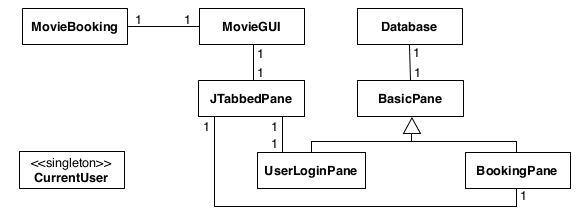
MovieBooking is the main program.
MovieGUI is the main class for the user interface.
JTabbedPane is one of the Swing standard classes. It describes a Swing component that may contain several tabs.
BasicPane is a general description of a tab in the program.
UserLoginPane is the “left tab”, which is used when a user logs in to the system.
BookingPane is the other tab, which is used when the user makes a reservation of a ticket for a movie performance.
Database handles all communication with the database system.
CurrentUser is a singleton class, which keeps track of the user that has logged in to the system. It is used by the classes UserLoginPane and BookingPane.
An object of the class BasicPane divides the available window area into two areas: left and right. The right-part is further divided into three areas: top, middle, and bottom. In the login tab the left area is empty. The top area contains the text “Username” and the text field where the user enters the username. The bottom area contains the login button and a message line.
In the reservation tab the left area contains two lists: one for movie names and one for performance dates. The top area contains labels and text fields used to display information about a movie performance. The bottom area contains the reservation button and a message line.
The program shall perform the following tasks:
When you click the Login button: log in with the specified username.
When you enter the reservation panel: show movie names in the movie name list.
When you select a movie name: show performance dates for the movie in the date list.
When you select a performance date: show all data concerning the performance in the text fields.
When you click Book ticket: make a ticket reservation. Two users that make reserva- tions simultaneously must not interfere with each other (the code must be transaction safe).
Consider which tasks that have to be performed in the database for each of the tasks a–e above.
JDBC calls are used for the communication between the program and the database system. You should not have a tight coupling between the user interface and the database communication, so you must collect all JDBC calls in a class Database. Parts of this class are already written.
Specify further methods in the class Database to perform the tasks a–e. Do not implement the methods yet. Advice: when you are to show information concerning a performance (task d), you have to fetch the information from the database. Do this by creating and returning an object of a class Performance, which has the same attributes as the corresponding table in the database.
When you select a movie name in the name list, the method valueChanged in the class NameSelectionListener (in the class BookingPane) is called (task c in assignment 4):
public void valueChanged(ListSelectionEvent e) {
    if (nameList.isSelectionEmpty()) {
        return;
    }
    String movieName = nameList.getSelectedValue();
    /* --- insert own code here --- */
}
Replace the comment with the appropriate Java code. The code will call one of the Database methods; implement that method.
Other methods, similar to valueChanged, must also be written. Do this, and implement the corresponding methods in the class Database.
To fetch a date column from a result set, use the method getString() (all you want to do with the date is to display it).
Compile and test the program. Don’t forget to test the case when you try to reserve a ticket for a fully-booked performance; in that case you should receive an error message.
When the program is executed it needs access to the SQLite JDBC driver (the class org.sqlite.JDBC), which is in the file sqlite-jdbc-5.16.1.jar.